APICrash - Dojo #47 Monthly Challenge for December 2025
Table of Contents
Introduction
This was written late last December
Hello :)
I haven’t published anything in a while, mainly because I got a full-time job :D yeheyy! One thing I noticed this year is that I’m very messy hahaha, not organized at all. Although I like being all over the place because my imagination is at its peak when I’m chaotic. I feel like my skills are not improving at all, and I have a hard time remembering topics I’ve read, so currently I have no choice but to start being more organized if I want to keep moving forward.
Anyway, I decided to keep a note :O of the things I did to solve this challenge so this is basically my approach and solution in solving YesWeHack’s monthly challenge for December 2025.
Also, if you haven’t tried any of the Dojos, I would highly suggest checking out https://dojo-yeswehack.com/challenge/tutorial first.
Discovering the Challenge
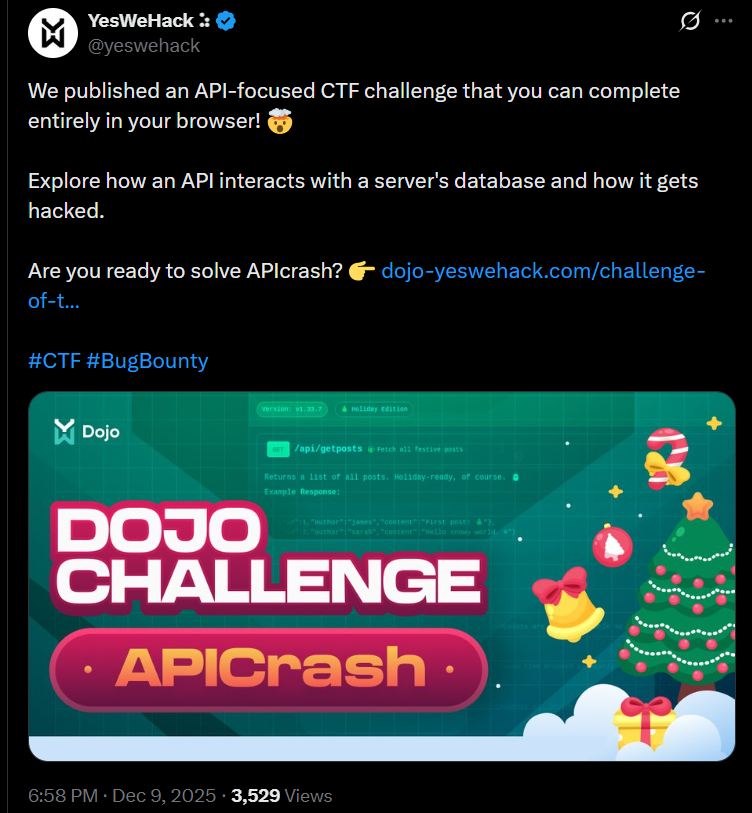
It was late at night, and I was doing my module (was on a deadline :P), but I got bored so I opened Twitter/X on my laptop then started scrolling lol, until YesWeHack’s post about the monthly dojo came up in my feed.
I remember trying so hard to solve the challenge for October “Dojo #45 - Chainfection”, and although I was in the right track (based on the published writeup), I wasn’t able to get the Flag :(
So I decided to stop doing my module and focus on solving YesWeHack’s monthly challenge for December :P
My Approach
YesWeHack’s Dojo is more on whitebox testing, so I started by gathering all of the available information.
- HTTP Request after entering our input
- Source Code #1 (setup)
- Source Code #2
HTTP-Request
POST /api/challenges/4620cbe4-08b0-40ed-b293-a1748916c660 HTTP/1.1
Host: dojo-yeswehack.com
[...]

input=crong
source-code-1.py
import os, faker, sqlite3
tinydb = import_v("tinydb", "4.7.1")
os.chdir("/tmp")
os.mkdir("templates")
db = tinydb.TinyDB('data.json')
# Set the flag
os.environ["FLAG"] = flag
db.insert_multiple([
{
'id': 1,
'title': "First day with the new API!",
'content': "Just deployed the initial version - endpoints are live and stable so far. Excited to see what breaks first!",
},
{
'id': 2,
'title': "Quick performance check",
'content': "Optimised a few queries today. The response time dropped by nearly 40%.",
},
{
'id': 3,
'title': "Minor update pushed",
'content': "Added better error handling for POST requests and improved logging across the board.",
}
])
with open('templates/index.html', 'w') as f:
f.write('''
<!DOCTYPE html>
<html lang="en" class="bg-gray-950 text-gray-100">
<head>
<meta charset="UTF-8" />
<meta
name="viewport"
content="width=840, height=565, initial-scale=1.0, maximum-scale=1.0"
/>
<title>Pro API</title>
<script src="https://cdn.tailwindcss.com"></script>
<style>
html,
body {
width: 100%;
height: 100%;
margin: 0;
overflow: hidden;
}
main {
height: calc(100% - 90px);
overflow-y: auto;
scrollbar-width: thin;
scrollbar-color: #334155 #020617;
}
.stars-container {
pointer-events: none;
}
.star {
position: absolute;
text-align: center;
align-items: center;
justify-items: center;
border-radius: 9999px;
font-size: 26px;
animation-name: fall;
animation-timing-function: linear;
animation-iteration-count: infinite;
}
@keyframes fall {
0% {
transform: translateY(0);
opacity: 0;
}
10% {
opacity: 0.9;
}
90% {
opacity: 0.9;
}
100% {
transform: translateY(110vh); /* past the bottom */
opacity: 0;
}
}
@keyframes twinkle {
0%,
100% {
transform: scale(1);
opacity: 0.7;
}
50% {
transform: scale(1.8);
opacity: 1;
}
}
</style>
</head>
<body class="font-mono text-emerald-50 relative overflow-hidden">
<!-- Starry background with twinkling stars -->
<div
id="stars-container"
class="absolute inset-0 z-0 pointer-events-none"
></div>
<header
class="relative z-10 border-b border-emerald-800/60 px-4 py-3 flex justify-between items-center bg-emerald-950/80 backdrop-blur"
>
<div class="flex items-center space-x-3">
<span
class="text-[10px] px-2 py-1 rounded-full bg-emerald-800/60 text-emerald-200 border border-emerald-600/60"
>
Version: v1.33.7
</span>
<span
class="inline-flex items-center text-[10px] px-2 py-1 rounded-full bg-red-700/70 text-red-50 border border-red-400/70"
>
🎄 Holiday Edition
</span>
</div>
<h1
class="text-xl font-bold text-emerald-300 flex items-center space-x-2"
>
<span>Pro API web interface</span>
</h1>
</header>
<main class="relative z-10 max-w-full px-4 py-3 space-y-3">
<!-- getPosts -->
<section
class="bg-slate-950/80 rounded-lg border border-emerald-800/70 shadow-lg shadow-emerald-900/40"
>
<button
class="w-full text-left px-4 py-3 flex justify-between items-center hover:bg-emerald-950/60 rounded-t-lg transition-colors"
onclick="toggleSection('getposts')"
>
<div class="flex items-center">
<span
class="bg-emerald-500 text-emerald-950 text-[10px] px-2 py-1 rounded mr-2 border border-emerald-300"
>
GET
</span>
<span class="font-semibold text-sm text-emerald-100"
>/api/getposts</span
>
<span
class="ml-2 text-[10px] text-emerald-300 flex items-center gap-1"
>
<span>🎁</span>
<span>Fetch all festive posts</span>
</span>
</div>
<svg
id="icon-getposts"
xmlns="http://www.w3.org/2000/svg"
class="h-4 w-4 text-emerald-300 transform transition-transform"
fill="none"
viewBox="0 0 24 24"
stroke="currentColor"
>
<path
stroke-linecap="round"
stroke-linejoin="round"
stroke-width="2"
d="M19 9l-7 7-7-7"
/>
</svg>
</button>
<div
id="body-getposts"
class="border-t border-emerald-900/70 p-3 space-y-2 text-xs bg-gradient-to-b from-slate-950/70 to-emerald-950/60"
>
<p class="text-emerald-100/90">
Returns a list of all posts. Holiday-ready, of course. 🎅
</p>
<p class="text-emerald-200 font-semibold mt-2">Example Response:</p>
<pre
class="bg-slate-900/80 p-2 rounded text-[11px] text-emerald-300 overflow-x-auto"
>
[
{"id":1,"author":"james","content":"First post! 🎄"},
{"id":2,"author":"sarah","content":"Hello snowy world. ❄"}
]</pre
>
<button
class="bg-emerald-500 hover:bg-emerald-400 px-3 py-1 rounded text-[11px] text-emerald-950 font-semibold shadow-sm shadow-emerald-900/60 transition-colors"
onclick="mockResponse('getposts')"
>
Try it out 🎁
</button>
<pre
id="resp-getposts"
class="mt-2 bg-slate-900/80 p-2 rounded text-[11px] text-emerald-200 overflow-x-auto"
>
{{ posts | safe}}</pre
>
</div>
</section>
<!-- updatePost -->
<section
class="bg-slate-950/80 rounded-lg border border-red-800/70 shadow-lg shadow-red-900/40"
>
<button
class="w-full text-left px-4 py-3 flex justify-between items-center hover:bg-red-950/60 rounded-t-lg transition-colors"
onclick="toggleSection('updatepost')"
>
<div class="flex items-center">
<span
class="bg-red-500 text-red-950 text-[10px] px-2 py-1 rounded mr-2 border border-red-300"
>
POST
</span>
<span class="font-semibold text-sm text-rose-100"
>/api/updatepost</span
>
<span
class="ml-2 text-[10px] text-rose-200 flex items-center gap-1"
>
<span>🕯</span>
<span>Update a cozy message</span>
</span>
</div>
<svg
id="icon-updatepost"
xmlns="http://www.w3.org/2000/svg"
class="h-4 w-4 text-rose-200 transform transition-transform"
fill="none"
viewBox="0 0 24 24"
stroke="currentColor"
>
<path
stroke-linecap="round"
stroke-linejoin="round"
stroke-width="2"
d="M19 9l-7 7-7-7"
/>
</svg>
</button>
<div
id="body-updatepost"
class="hidden border-t border-red-900/70 p-3 space-y-2 text-xs bg-gradient-to-b from-slate-950/70 to-red-950/60"
>
<p class="text-rose-100/90">
Updates a post's content by ID. Perfect for last-minute holiday
edits. ✨
</p>
<label class="block text-rose-100 text-xs mt-1">ID:</label>
<input
id="id"
type="number"
placeholder="e.g. 1"
class="w-full bg-slate-900/80 p-1.5 rounded border border-rose-700/70 text-xs text-rose-50 placeholder:text-rose-300/60"
/>
<label class="block text-rose-100 text-xs mt-1">Content:</label>
<textarea
id="content"
placeholder="Updated festive content..."
class="w-full bg-slate-900/80 p-1.5 rounded border border-rose-700/70 text-xs text-rose-50 placeholder:text-rose-300/60"
></textarea>
<button
class="bg-red-500 hover:bg-red-400 px-3 py-1 rounded text-[11px] text-red-950 font-semibold shadow-sm shadow-red-900/60 transition-colors"
>
Try it out 🎄
</button>
<pre
id="resp-updatepost"
class="hidden mt-2 bg-slate-900/80 p-2 rounded text-[11px] text-rose-200 overflow-x-auto"
></pre>
</div>
</section>
</main>
<footer
class="relative z-10 text-center text-[10px] text-emerald-300 border-t border-emerald-800/60 py-2 bg-emerald-950/80 backdrop-blur"
>
<div class="flex items-center justify-center gap-2">
<span>2025 Pro developer team</span>
<span class="text-xs">-</span>
<span>Wishing you safe & secure holidays 🎁🔐</span>
</div>
</footer>
<script>
function toggleSection(id) {
const body = document.getElementById("body-" + id);
const icon = document.getElementById("icon-" + id);
body.classList.toggle("hidden");
icon.classList.toggle("rotate-180");
}
function mockResponse(endpoint) {
const responseElement = document.getElementById("resp-" + endpoint);
responseElement.classList.remove("hidden");
}
function generateStars(count) {
const container = document.getElementById("stars-container");
for (let i = 0; i < count; i++) {
const star = document.createElement("span");
star.classList.add("star");
star.innerText = Math.floor(Math.random() * 2);
// Random position
const top = Math.random() * 100;
const left = Math.random() * 100;
// Random size (1.5 - 3.5px)
const size = 1.5 + Math.random() * 2;
// Random animation duration + delay
const duration = 2.5 + Math.random() * 2;
const delay = Math.random() * 2;
star.style.top = top + "%";
star.style.left = left + "%";
star.style.width = size + "px";
star.style.height = size + "px";
star.style.animationDuration = duration + "s";
star.style.animationDelay = delay + "s";
container.appendChild(star);
}
}
// Create stars once the page loads
window.addEventListener("DOMContentLoaded", () => {
generateStars(100); // Change this number to control density
});
window.addEventListener("DOMContentLoaded", () => {
mockResponse("getposts");
});
</script>
</body>
</html>
'''.strip())
source-code-2.py
import os, json, tinydb, graphene, threading
from urllib.parse import unquote
from jinja2 import Environment, FileSystemLoader

template = Environment(
    autoescape=True,
    loader=FileSystemLoader('/tmp/templates'),
).get_template('index.html')
os.chdir('/tmp')
threads = []
db = tinydb.TinyDB('data.json')

# Define a proper Post type so Graphene knows the structure
class Post(graphene.ObjectType):
    id = graphene.Int()
    content = graphene.String()

class GraphqlQuery(graphene.ObjectType):
    get_posts = graphene.List(Post)
    update_post = graphene.Boolean(id=graphene.Int(), content=graphene.String())

    def update_post_in_db(id, content):
        node = db.search(tinydb.Query().id == int(id))
        if node == []:
            return False
        else:
            node[0]['content'] = content
            db.update(node[0], tinydb.Query().id == int(id))
            return True

    def resolve_update_post(self, info, id, content):
        t = threading.Thread(target=GraphqlQuery.update_post_in_db, args=[id, content])
        t.start()
        threads.append(t)

    def resolve_get_posts(self, info):
        return db.all()

def main():
    # User input (GraphQL query)
    query = unquote("")

    schema = graphene.Schema(query=GraphqlQuery)
    schema.execute(query)

    # Wait for all GraphQL processes to finish
    for t in threads:
        t.join()
    result = schema.execute("{ getPosts { id content } }")

    # Check if the JSON in the posts are malformed
    posts = {}

    # TODO : Random crashes appear time to time with same input, but different error. We working on a fix.
    if result.errors:
        posts = json.dumps({"FLAG": os.environ["FLAG"]}, indent=2)
    else:
        posts = json.dumps(result.data, indent=2)

    print(template.render(posts=posts))

main()
Reviewing Source Code #2
The first idea that I thought of is to search for the word “FLAG”.
Line 54:
# TODO : Random crashes appear time to time with same input, but different error. We working on a fix.
if result.errors:
	posts = json.dumps({"FLAG": os.environ["FLAG"]}, indent=2)
else:
	posts = json.dumps(result.data, indent=2)

print(template.render(posts=posts))
Wow, this looks easy, I just need result.errors to return true and the application will print the FLAG…but I don’t know how to reach that line…yet. Next, I noticed that there are comments in the code, so I noted them all down.
- Define a proper Post type so Graphene knows the structure (L.13)
- User input (GraphQL query) (L.40)
- Wait for all GraphQL processes to finish (L.46)
- Check if the JSON in the posts are malformed (L.51)
- TODO : Random crashes appear time to time with same input, but different error. We working on a fix. (L.54)
These gives me a lot of information on what to work and focus on. First, I now know that the application uses something called “Graphene”, where the input is going (GraphQL query, and usage of threads, and a very big clue. The end goal is to get a crash, so I can reach the Line that will dump the FLAG.
These information gives me multiple ideas:
- does this thing called “Graphene” have a known security issue…maybe a CVE?
- Threading? Race Conditions?
- Trace the flow of the input and figure out how to trigger a crash?
Figuring out how to trigger a crash seems to be the best and fastest way right now, because 1. There is no mention of the version of “Graphene” so I don’t have any idea on what CVE to look for, 2. Testing for race conditions blindly would be a disadvantage because I already have the code.
so I started reading…A LOT!!!
A quick Google Search of graphene result.error leads me to Graphene’s documentation https://docs.graphene-python.org/en/latest/execution/execute/.
resultrepresents the result of execution.result.datais the result of executing the query,result.errorsisNoneif no errors occurred, and is a non-empty list if an error occurred.
Aha, my assumptions were correct! and from here, I continued to read the code starting from below, to get an idea on how I can trigger a crash.
Line 40:
    # User input (GraphQL query)
    query = unquote("")

    schema = graphene.Schema(query=GraphqlQuery)
    schema.execute(query)

    # Wait for all GraphQL processes to finish
    for t in threads:
        t.join()
    result = schema.execute("{ getPosts { id content } }")

    # Check if the JSON in the posts are malformed
    posts = {}
Cool, now I know that result is the response of the getPosts operation…but I still have no idea how to trigger a crash.
Reviewing Source Code #1
At this point, I decided to take a look at the setup code.
import os, faker, sqlite3
tinydb = import_v("tinydb", "4.7.1")
os.chdir("/tmp")
os.mkdir("templates")
db = tinydb.TinyDB('data.json')
Whenever I see an application importing something with a cetain version, my first idea is to always check that version and see if there are any known security issue for it.
So…I did. I searched for things like “Tinydb 4.7.1 CVE”, “Tinydb 4.7.1 security issue”, “Tinydb 4.7.1 security vulnerability”, and eventually landed on https://medium.com/@deadoverflow/dear-backend-developers-dont-use-tinydb-for-your-python-web-servers-940adc1c8d1d.
This seems a very good lead since the author talks about “DoS/Data corruption”, and they even linked a Github issue https://github.com/msiemens/tinydb/issues/529.
If an attacker sends few requests to update the node with it’s corresponding id within a second or 2 the last byte of the database, in this case, “data.json” would be replaced by a NULL byte thus triggering an internal server error and the web application is unusable from that point on.
Nice, this is super great, now I know that it may be possible to trigger a crash if I update a node super fast.
Trying hard copycat lol
Yehey!!! so I tried to copy the author’s PoC + because of the UI, I sent a bunch of requests to /api/getposts and /api/updatepost, but the requests returned 404. So I thought I needed to figure out the correct path.
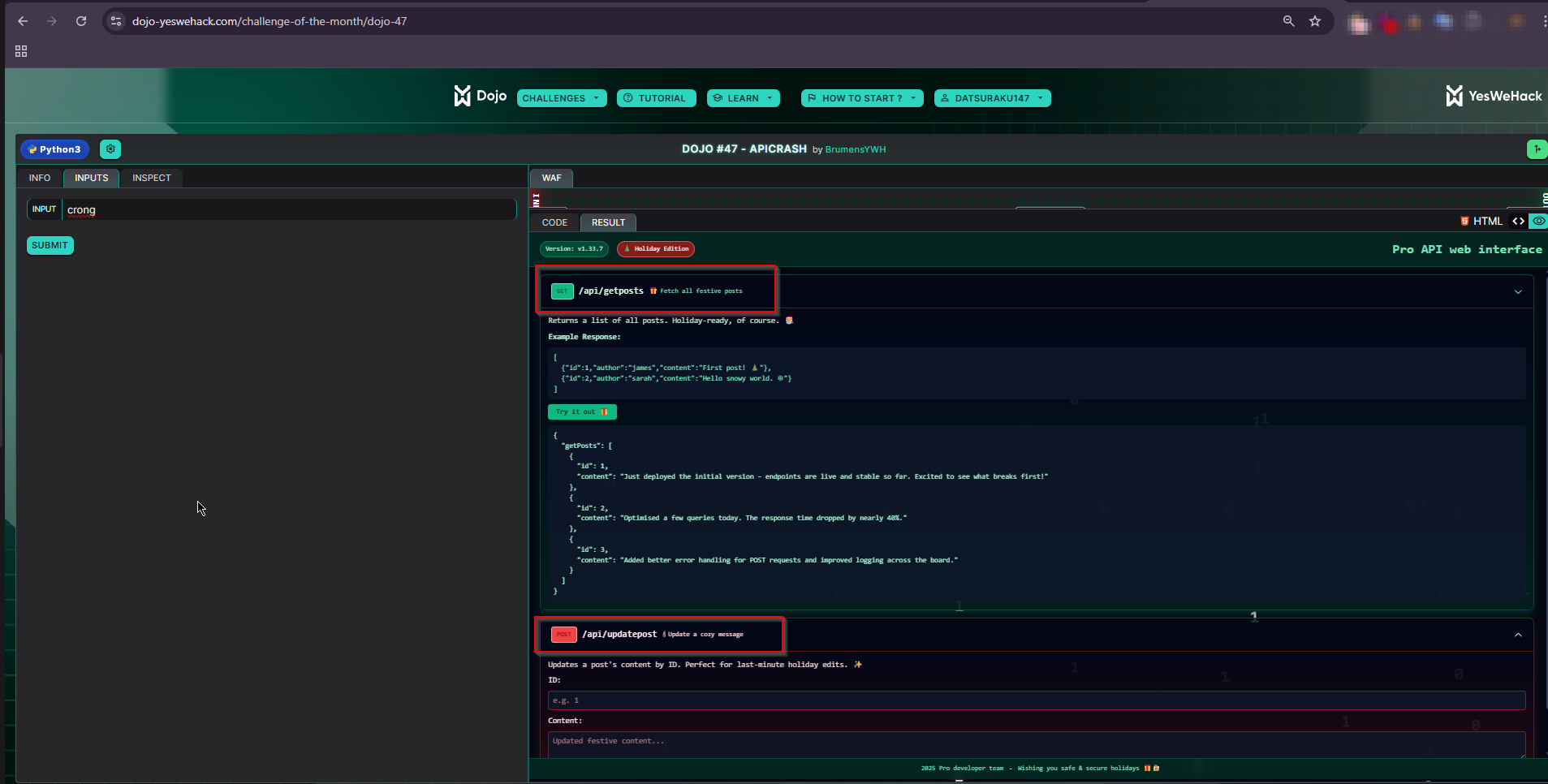
Trust me!!! I 100% did not waste an evening and morning trying to find the correct path T_T.
Figuring out how to update a post
After a lot of frustration xD, I realized that I’m super dumb :P
Source Code #2:
class GraphqlQuery(graphene.ObjectType):
    get_posts = graphene.List(Post)
    update_post = graphene.Boolean(id=graphene.Int(), content=graphene.String())

[...]

# User input (GraphQL query)
query = unquote("")

schema = graphene.Schema(query=GraphqlQuery)
schema.execute(query)

# Wait for all GraphQL processes to finish
for t in threads:
	t.join()
result = schema.execute("{ getPosts { id content } }")
The input is being passed to schema.execute(), and looking at the result variable, I figured I can do the same thing for updating a post.
Why getPosts and not get_posts???
Fun little knowledge, I was curious as to why it is using getPosts instead of get_posts as stated in the GraphqlQuery class. Turns out, according to Graphene’s documentation for objecttypes:
Graphene automatically camelcases fields on ObjectType from
field_nametofieldNameto conform with GraphQL standards.
As a result, it converts get_posts to getPosts, and the same conversion applies to update_post, which becomes updatePost.
Let’s gooo! I was super excited, because I finally discovered how to use the update_post operation, so I excitedly modified getPosts to be updatePost, and followed my instinct to add values to id and content.
But…it wasn’t working :( The content is still the same. Grrrrrrrrrrr!
{ updatePost { id=1 content="test" } }
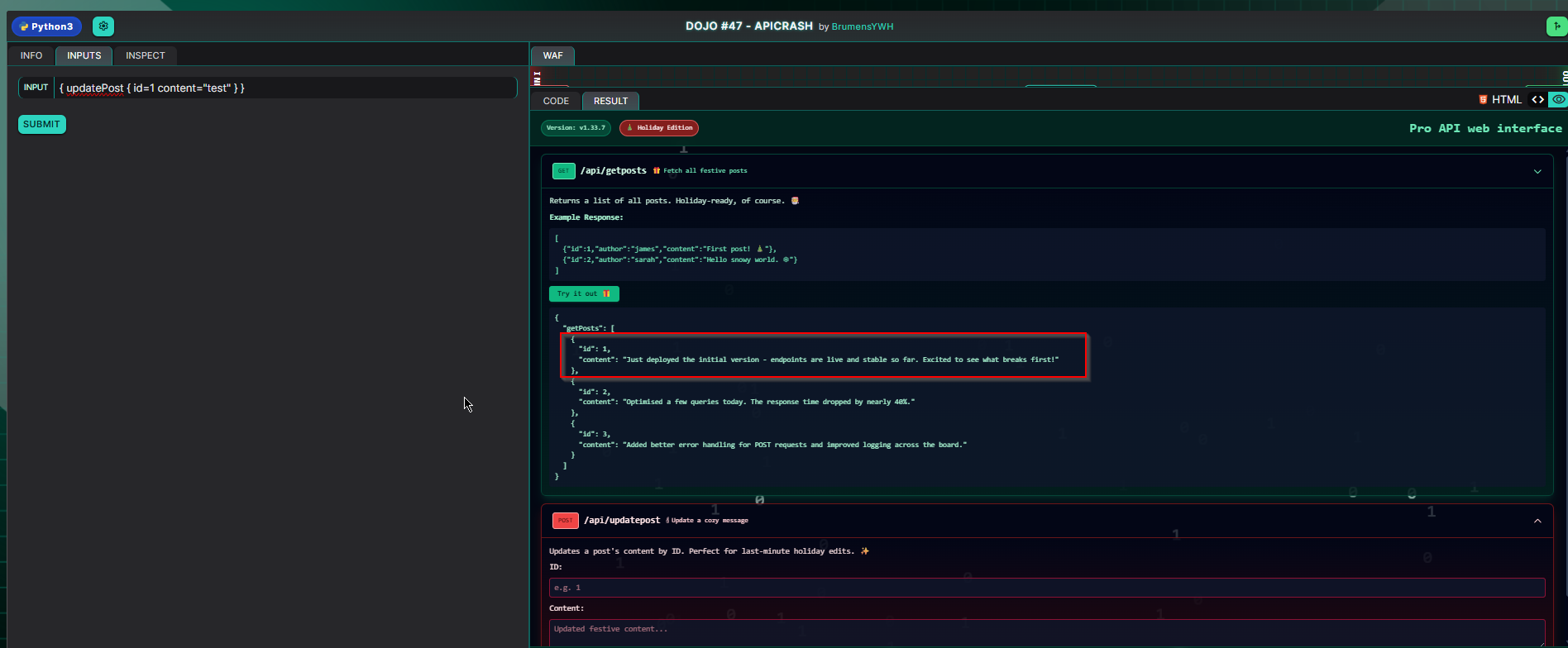
Why is it not working? T_T I ask myself.
Guess what…I’m really super dumb hahahaha.
After some suffering, I discovered this thing called “arguments”…wow, crazy lmao :P
A simple structure is like:
{
  picture(width: 200, height: 100)
}
following this, I crafted:
{ updatePost(id:1, content:"test") }
and…yeheyyyy! I was finally able to update a post, and it only took me 3 minutes after I started the challenge so much suffering T_T.
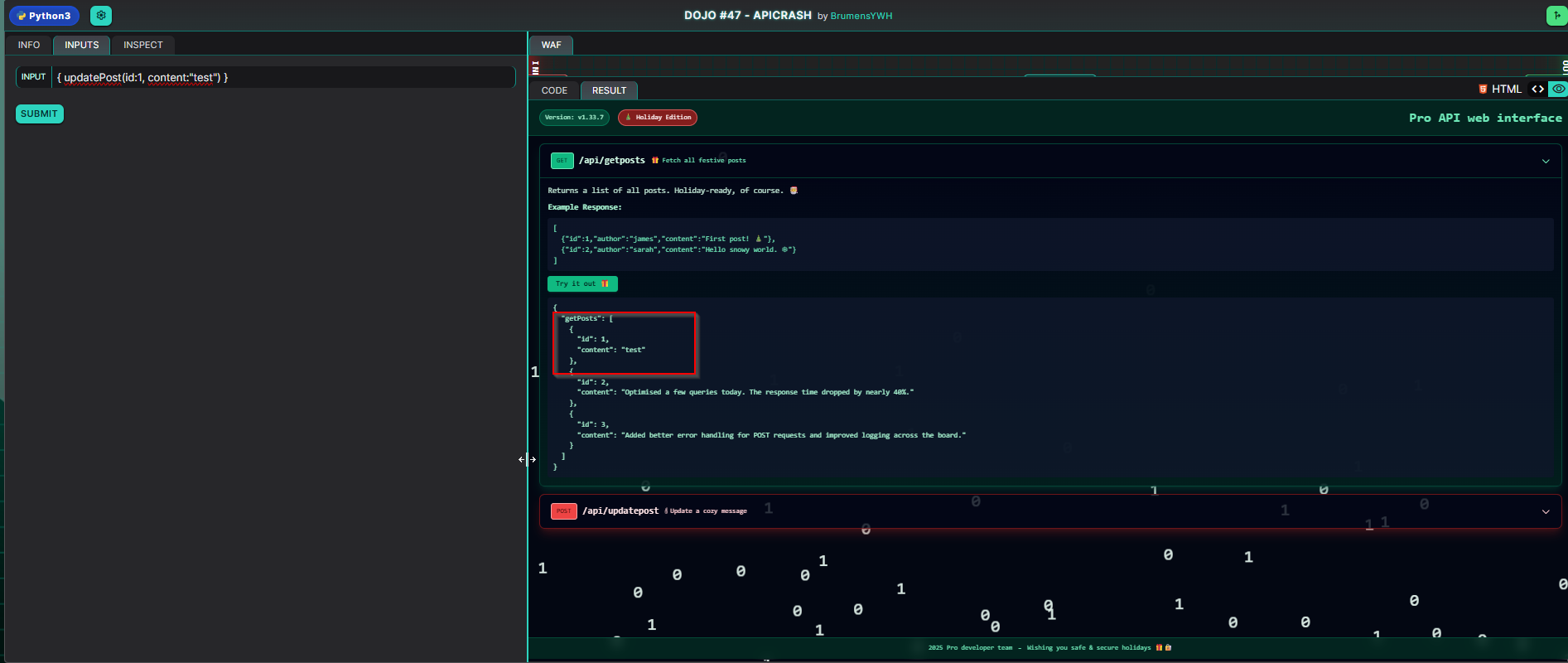
Updating a Post is cool but getting the FLAG is cooler
Now that I’m able to update a post, I went back to https://github.com/msiemens/tinydb/issues/529. The plan is to make a PoC using the updatePost operation, similar to the author’s PoC to trigger a crash.
So I did…but it wasn’t working…I keep on getting rate-limited. WTFFFFFFF!

I had two ideas, either I need to bypass the rate-limiting or my whole approach is wrong and I’m basically fucked! Because, I just spent so much time figuring out how to fucking update a post AND I still can’t get the fucking FLAG.
Welp… after a lot of headbanging on the wall after a relaxing walk outside, I found a light, my grace, my saviour, the answer that will save me from this suffering. Remember how I first discovered the challenge? The Twitter thingy? It actually gives us a hint.
We published an API-focused CTF challenge that you can complete entirely in your browser!
And so, based on this information, it’s enough to say that my approach is 100% wrong hahahahaha fuck. Well, at least I can now stop creating scripts and forget about bypassing the rate-limit.
How TF do I crash this thing? T_T I ask myself again.
Triggering a crash
Well, there’s only one way to find out and it’s quite easy, read the motherfucking documentation T_T.
Without wasting your time, let’s just say I stumbled upon this page almost instantly… like, 1 minute after crying realizing that I should continue reading the docs: https://graphql.org/learn/security/#breadth-and-batch-limiting
In addition to limiting operation depth, there should also be guardrails in place to limit the number of top-level fields and field aliases included in a single operation. Consider what would happen during the execution of the following query operation:
query {
  viewer {
    friends1: friends(limit: 1) { name }
    friends2: friends(limit: 2) { name }
    friends3: friends(limit: 3) { name }
    # ...
    friends100: friends(limit: 100) { name }
  }
}
Even though the overall depth of this query is shallow, the underlying data source for the API will still have to handle a large number of requests to resolve data for the aliased
herofield.
“handle large number of request”…hmmm interesting. The behaviour is similar to the PoC in https://github.com/msiemens/tinydb/issues/529, but this time, it’s possible that we only need 1 request?
So, I looked into Aliases, and from my understanding, it’s just like a variable in coding where instead of:
var friends = query
we have:
friends: query
Now, I followed the idea from Breadth & Batch Limiting page; multiple aliases calling the same field in one request.
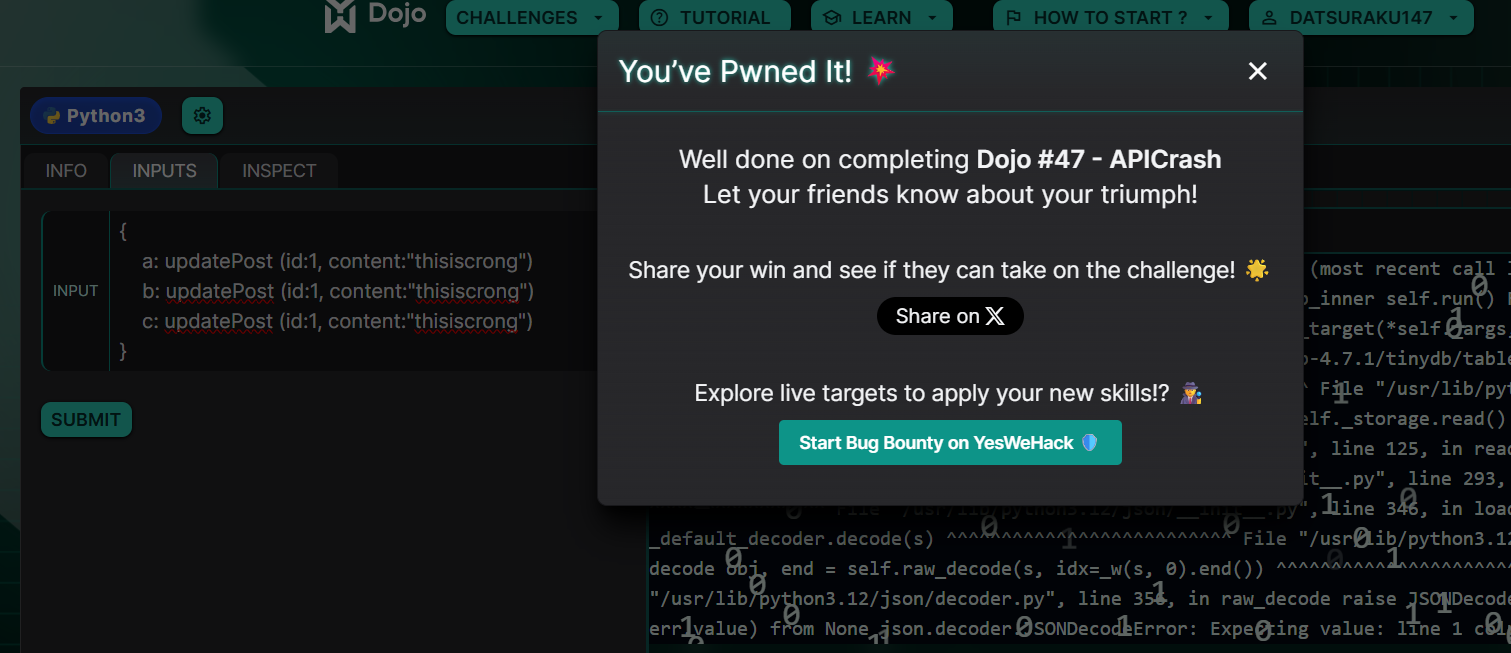
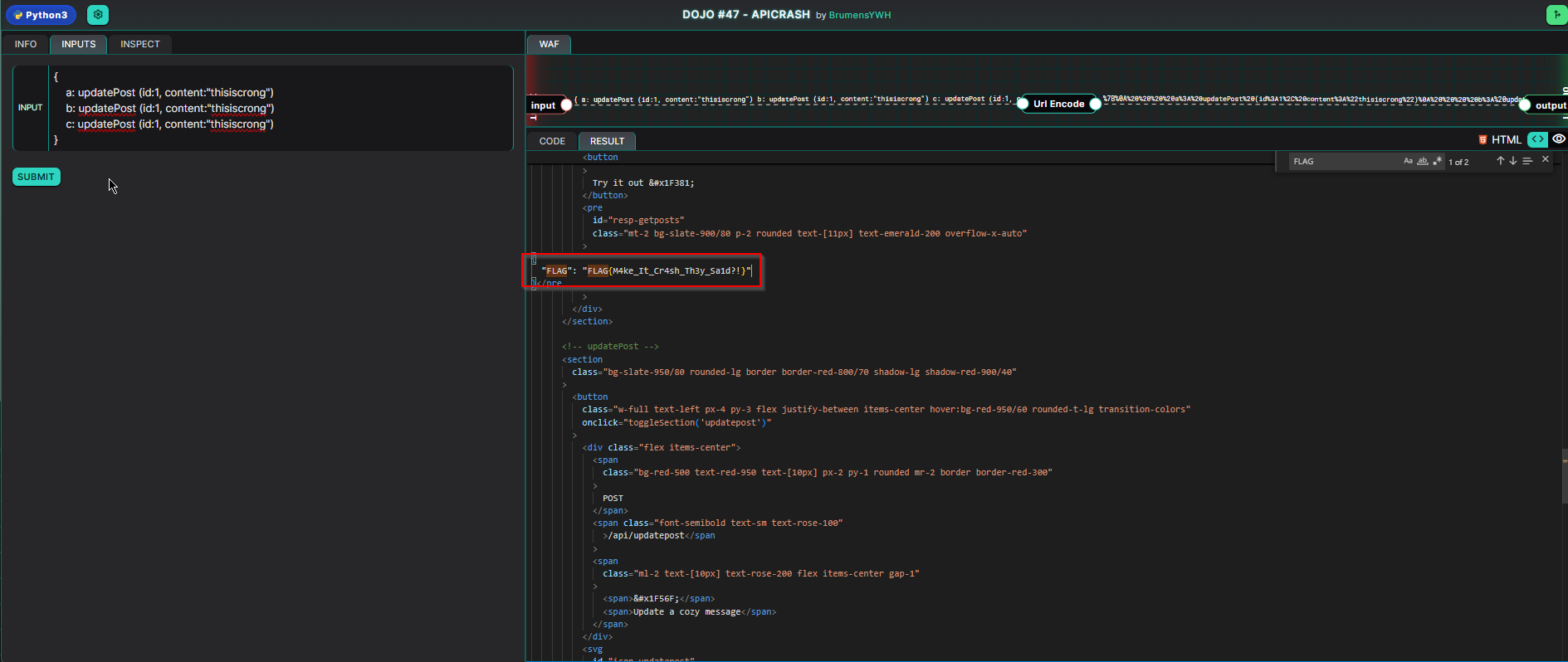
{
    a: updatePost (id:1, content:"thisiscrong")
    b: updatePost (id:1, content:"thisiscrong")
    c: updatePost (id:1, content:"thisiscrong")
}
and…wait for it…I finally get a crash, along with the FLAG.
FLAG{M4ke_It_Cr4sh_Th3y_Sa1d?!}
Thanks a lot to @Brumens for creating this fun challenge.